<?xml version="1.0" encoding="UTF-8"?>
<feed xmlns="http://www.w3.org/2005/Atom" xml:lang="en-us">
  <title type="text">Tiki RSS feed for the wiki pages</title>
  <subtitle type="text">Latest wiki page changes.</subtitle>
  <logo>https://www.openstm32.org/img/tiki/Tiki_WCG.png</logo>
  <updated>2026-08-22T12:14:05+00:00</updated>
  <generator uri="https://getlaminas.org" version="2">Laminas_Feed_Writer</generator>
  <link rel="alternate" type="text/html" href="https://www.openstm32.org/"/>
  <link rel="self" type="application/atom+xml" href="https://www.openstm32.org/tiki-wiki_rss.php"/>
  <id>https://www.openstm32.org/</id>
  <entry>
    <title type="html"><![CDATA[System Workbench for STM32]]></title>
    <summary type="html"><![CDATA[<blockquote>- </p></blockquote><blockquote>- </blockquote><blockquote>- <h2 class="showhide_heading d-flex justify-content-start" id="Registration">Registration<a href="#Registration" class="heading-link" aria-label="heading link"><span class="icon icon-link fas fa-link "   ></span></a></h2></blockquote><blockquote>- <p>Accessing OpenSTM32.org is free, but you need to be logged in to have access to some parts of the site, like the System Workbench for STM32 documentation and download instructions.</blockquote><blockquote>- </p></blockquote><blockquote>- </blockquote><blockquote>- <p>You should either <a class="wiki"   href="tiki-login.php" rel="">Log in</a> or <a class="wiki"   href="tiki-register.php" rel="">register</a> on OpenSTM32.org.</blockquote>]]></summary>
    <published>2026-07-28T22:33:15+00:00</published>
    <updated>2026-07-28T22:33:15+00:00</updated>
    <link rel="alternate" type="text/html" href="https://www.openstm32.org/tiki-index.php?page=System+Workbench+for+STM32"/>
    <id>https://www.openstm32.org/tiki-index.php?page=System+Workbench+for+STM32</id>
  </entry>
  <entry>
    <title type="html"><![CDATA[Welcome Authors]]></title>
    <summary type="html"><![CDATA[<blockquote>- &lt;p&gt;<br>&lt;/li&gt;&lt;/ol&gt;<del class="diffchar deleted"><strong>&lt;br /&gt;REDIRECT plugin: redirect loop detected!<br>&lt;/p&gt;<br></strong></del></blockquote><blockquote>+ &lt;<ins class="diffchar inserted"><strong>p&gt;&lt;/</strong></ins>p&gt;<br>&lt;/li&gt;&lt;/ol&gt;</blockquote>]]></summary>
    <published>2026-07-25T23:45:40+00:00</published>
    <updated>2026-07-25T23:45:40+00:00</updated>
    <link rel="alternate" type="text/html" href="https://www.openstm32.org/tiki-index.php?page=Welcome+Authors"/>
    <id>https://www.openstm32.org/tiki-index.php?page=Welcome+Authors</id>
  </entry>
  <entry>
    <title type="html"><![CDATA[Article Submission Guidelines]]></title>
    <summary type="html"><![CDATA[<blockquote>+ <p>Thanks for contributing to the OpenSTM32 community. A few things to keep your article a good fit.</blockquote><blockquote>+ </p></blockquote><blockquote>+ </blockquote><blockquote>+ <h2 class="showhide_heading d-flex justify-content-start" id="What_we_publish">What we&nbsp;publish<a href="#What_we_publish" class="heading-link" aria-label="heading link"><span class="icon icon-link fas fa-link "   ></span></a></h2></blockquote><blockquote>+ <p>Technical articles for STM32 developers: tutorials, how-tos, deep dives, tips, tooling and project write-ups. Modern topics are especially welcome, including AI-assisted development (using AI to generate or review code, plus prompts, skills and workflow tips) and edge AI, running machine learning and on-device inference on STM32. Focus on the engineering, the <strong>how</strong> and <strong>why</strong>, with code, configuration or diagrams where they help.</blockquote><blockquote>+ </p></blockquote><blockquote>+ </blockquote><blockquote>+ <h2 class="showhide_heading d-flex justify-content-start" id="Keep_it_technical">Keep it&nbsp;technical<a href="#Keep_it_technical" class="heading-link" aria-label="heading link"><span class="icon icon-link fas fa-link "   ></span></a></h2></blockquote><blockquote>+ <p>Articles should teach or inform. Lead with the technical value.</blockquote><blockquote>+ </p></blockquote><blockquote>+ </blockquote><blockquote>+ <h2 class="showhide_heading d-flex justify-content-start" id="Using_AI_to_write_or_generate_code">Using AI to write or generate&nbsp;code<a href="#Using_AI_to_write_or_generate_code" class="heading-link" aria-label="heading link"><span class="icon icon-link fas fa-link "   ></span></a></h2></blockquote><blockquote>+ <p>Using AI tools to help draft an article or generate code is fine. What matters is the result: the published article must read as your own work, not raw AI output. Edit it for accuracy, keep it specific and hands-on, and cut the generic filler and hedging that unedited AI text tends to carry. You are responsible for everything you publish being correct.</blockquote><blockquote>+ </p></blockquote><blockquote>+ </blockquote><blockquote>+ <h2 class="showhide_heading d-flex justify-content-start" id="Promotion_and_links">Promotion and&nbsp;links<a href="#Promotion_and_links" class="heading-link" aria-label="heading link"><span class="icon icon-link fas fa-link "   ></span></a></h2></blockquote><blockquote>+ <p>You are welcome to mention and link your own tools, products or solutions, and to link your LinkedIn profile. The article itself must stay <strong>technical, not promotional</strong>: write it as a useful engineering piece, not an advert, and keep promotional links relevant and brief.</blockquote><blockquote>+ </p></blockquote><blockquote>+ </blockquote><blockquote>+ <h2 class="showhide_heading d-flex justify-content-start" id="Announcements">Announcements<a href="#Announcements" class="heading-link" aria-label="heading link"><span class="icon icon-link fas fa-link "   ></span></a></h2></blockquote><blockquote>+ <p>Regular articles keep the <strong>Topic</strong> set to <strong>None</strong>. To announce a new STM32-related tool or release (yours or a third party's, compatible with or built for STM32), pick the <strong>Announcements</strong> topic when you submit. An announcement may be promotional, but keep it technical: explain what the tool actually provides, what it does and where it helps, rather than marketing.</blockquote><blockquote>+ </p></blockquote><blockquote>+ </blockquote><blockquote>+ <h2 class="showhide_heading d-flex justify-content-start" id="Format">Format<a href="#Format" class="heading-link" aria-label="heading link"><span class="icon icon-link fas fa-link "   ></span></a></h2></blockquote><blockquote>+ <p>Give your article a clear title and a short teaser, then the body. You can drag and drop images straight into the editor. Please credit any sources you build on.</blockquote><blockquote>+ </p></blockquote><blockquote>+ </blockquote><blockquote>+ <h2 class="showhide_heading d-flex justify-content-start" id="Review">Review<a href="#Review" class="heading-link" aria-label="heading link"><span class="icon icon-link fas fa-link "   ></span></a></h2></blockquote><blockquote>+ <p>Submissions are moderated before they go live, and we may lightly edit for clarity or formatting. Please be respectful and on topic.</blockquote><blockquote>+ </p></blockquote><blockquote>+ </blockquote><blockquote>+ <h2 class="showhide_heading d-flex justify-content-start" id="Disclaimer">Disclaimer<a href="#Disclaimer" class="heading-link" aria-label="heading link"><span class="icon icon-link fas fa-link "   ></span></a></h2></blockquote><blockquote>+ <p>Articles reflect their authors' own views. The OpenSTM32 team is not responsible for their accuracy, nor for any third-party tools, products or links they reference.</p></blockquote><blockquote>+ </blockquote>]]></summary>
    <published>2026-07-25T22:02:10+00:00</published>
    <updated>2026-07-25T22:02:10+00:00</updated>
    <link rel="alternate" type="text/html" href="https://www.openstm32.org/tiki-index.php?page=Article+Submission+Guidelines"/>
    <id>https://www.openstm32.org/tiki-index.php?page=Article+Submission+Guidelines</id>
  </entry>
  <entry>
    <title type="html"><![CDATA[Configure an ADC channel with the Devicetree Manager]]></title>
    <summary type="html"><![CDATA[<blockquote>+ </p></blockquote><blockquote>+ </blockquote><blockquote>+ <h2 class="showhide_heading d-flex justify-content-start" id="Before_you_start"> Before you&nbsp;start<a href="#Before_you_start" class="heading-link" aria-label="heading link"><span class="icon icon-link fas fa-link "   ></span></a></h2></blockquote><blockquote>+ <p>Install and open the Devicetree Manager as shown in <a href="Installing%2Bthe%2BDevicetree%2BManager%2Bfor%2BZephyr" title="Install the Devicetree Manager from the Marketplace or Open VSX; use it with or without Workbench for Zephyr." class="wiki wiki_page">Installing the Devicetree Manager for Zephyr</a>. If you are new to Zephyr on STM32, start with <a href="Getting%2Bstarted%2Bwith%2BWorkbench%2Bfor%2BZephyr" title="A first Zephyr project on STM32 with Workbench for Zephyr, with a short video." class="wiki wiki_page">Getting started with Workbench for Zephyr</a>.</blockquote>]]></summary>
    <published>2026-07-12T00:15:33+00:00</published>
    <updated>2026-07-12T00:15:33+00:00</updated>
    <link rel="alternate" type="text/html" href="https://www.openstm32.org/tiki-index.php?page=Configure+an+ADC+channel+with+the+Devicetree+Manager"/>
    <id>https://www.openstm32.org/tiki-index.php?page=Configure+an+ADC+channel+with+the+Devicetree+Manager</id>
  </entry>
  <entry>
    <title type="html"><![CDATA[Configure a SPI peripheral with the Devicetree Manager]]></title>
    <summary type="html"><![CDATA[<blockquote>+ </p></blockquote><blockquote>+ </blockquote><blockquote>+ <h2 class="showhide_heading d-flex justify-content-start" id="Before_you_start"> Before you&nbsp;start<a href="#Before_you_start" class="heading-link" aria-label="heading link"><span class="icon icon-link fas fa-link "   ></span></a></h2></blockquote><blockquote>+ <p>Install and open the Devicetree Manager as shown in <a href="Installing%2Bthe%2BDevicetree%2BManager%2Bfor%2BZephyr" title="Install the Devicetree Manager from the Marketplace or Open VSX; use it with or without Workbench for Zephyr." class="wiki wiki_page">Installing the Devicetree Manager for Zephyr</a>. If you are new to Zephyr on STM32, start with <a href="Getting%2Bstarted%2Bwith%2BWorkbench%2Bfor%2BZephyr" title="A first Zephyr project on STM32 with Workbench for Zephyr, with a short video." class="wiki wiki_page">Getting started with Workbench for Zephyr</a>.</blockquote>]]></summary>
    <published>2026-07-12T00:15:33+00:00</published>
    <updated>2026-07-12T00:15:33+00:00</updated>
    <link rel="alternate" type="text/html" href="https://www.openstm32.org/tiki-index.php?page=Configure+a+SPI+peripheral+with+the+Devicetree+Manager"/>
    <id>https://www.openstm32.org/tiki-index.php?page=Configure+a+SPI+peripheral+with+the+Devicetree+Manager</id>
  </entry>
  <entry>
    <title type="html"><![CDATA[Configure a USART with the Devicetree Manager]]></title>
    <summary type="html"><![CDATA[<blockquote>+ </p></blockquote><blockquote>+ </blockquote><blockquote>+ <h2 class="showhide_heading d-flex justify-content-start" id="Before_you_start"> Before you&nbsp;start<a href="#Before_you_start" class="heading-link" aria-label="heading link"><span class="icon icon-link fas fa-link "   ></span></a></h2></blockquote><blockquote>+ <p>Install and open the Devicetree Manager as shown in <a href="Installing%2Bthe%2BDevicetree%2BManager%2Bfor%2BZephyr" title="Install the Devicetree Manager from the Marketplace or Open VSX; use it with or without Workbench for Zephyr." class="wiki wiki_page">Installing the Devicetree Manager for Zephyr</a>. If you are new to Zephyr on STM32, start with <a href="Getting%2Bstarted%2Bwith%2BWorkbench%2Bfor%2BZephyr" title="A first Zephyr project on STM32 with Workbench for Zephyr, with a short video." class="wiki wiki_page">Getting started with Workbench for Zephyr</a>.</blockquote>]]></summary>
    <published>2026-07-12T00:15:33+00:00</published>
    <updated>2026-07-12T00:15:33+00:00</updated>
    <link rel="alternate" type="text/html" href="https://www.openstm32.org/tiki-index.php?page=Configure+a+USART+with+the+Devicetree+Manager"/>
    <id>https://www.openstm32.org/tiki-index.php?page=Configure+a+USART+with+the+Devicetree+Manager</id>
  </entry>
  <entry>
    <title type="html"><![CDATA[Configure an I2C peripheral with the Devicetree Manager]]></title>
    <summary type="html"><![CDATA[<blockquote>+ </p></blockquote><blockquote>+ </blockquote><blockquote>+ <h2 class="showhide_heading d-flex justify-content-start" id="Before_you_start"> Before you&nbsp;start<a href="#Before_you_start" class="heading-link" aria-label="heading link"><span class="icon icon-link fas fa-link "   ></span></a></h2></blockquote><blockquote>+ <p>Install and open the Devicetree Manager as shown in <a href="Installing%2Bthe%2BDevicetree%2BManager%2Bfor%2BZephyr" title="Install the Devicetree Manager from the Marketplace or Open VSX; use it with or without Workbench for Zephyr." class="wiki wiki_page">Installing the Devicetree Manager for Zephyr</a>. If you are new to Zephyr on STM32, start with <a href="Getting%2Bstarted%2Bwith%2BWorkbench%2Bfor%2BZephyr" title="A first Zephyr project on STM32 with Workbench for Zephyr, with a short video." class="wiki wiki_page">Getting started with Workbench for Zephyr</a>.</blockquote>]]></summary>
    <published>2026-07-12T00:15:33+00:00</published>
    <updated>2026-07-12T00:15:33+00:00</updated>
    <link rel="alternate" type="text/html" href="https://www.openstm32.org/tiki-index.php?page=Configure+an+I2C+peripheral+with+the+Devicetree+Manager"/>
    <id>https://www.openstm32.org/tiki-index.php?page=Configure+an+I2C+peripheral+with+the+Devicetree+Manager</id>
  </entry>
  <entry>
    <title type="html"><![CDATA[Installing the Devicetree Manager for Zephyr]]></title>
    <summary type="html"><![CDATA[<blockquote>- &lt;p&gt;&lt;img src=&quot;<del class="diffchar deleted"><strong>http</strong></del>s<del class="diffchar deleted"><strong>:</strong></del>/<del class="diffchar deleted"><strong>/z-w</strong></del>o<del class="diffchar deleted"><strong>rkb</strong></del>en<del class="diffchar deleted"><strong>ch</strong></del>.<del class="diffchar deleted"><strong>c</strong></del>o<del class="diffchar deleted"><strong>m/im</strong></del>g/<del class="diffchar deleted"><strong>up</strong></del>d<del class="diffchar deleted"><strong>a</strong></del>t<del class="diffchar deleted"><strong>e</strong></del>/wfz<del class="diffchar deleted"><strong>_</strong></del>o<del class="diffchar deleted"><strong>ve</strong></del>r<del class="diffchar deleted"><strong>view</strong></del>.png&quot;  width=&quot;<del class="diffchar deleted"><strong>8</strong></del>2<br>&quot; class=&quot;regImage pluginImg img-fluid &quot; alt=&quot;The Workbench for Zephyr si<del class="diffchar deleted"><strong>d</strong></del>e<del class="diffchar deleted"><strong> bar</strong></del>, with the Devicetree Manager <del class="diffchar deleted"><strong>shortcu</strong></del>t&quot; /&gt;</blockquote><blockquote>+ &lt;p&gt;&lt;img src=&quot;<ins class="diffchar inserted"><strong>/file</strong></ins>s/o<ins class="diffchar inserted"><strong>p</strong></ins>en<ins class="diffchar inserted"><strong>stm32</strong></ins>.o<ins class="diffchar inserted"><strong>r</strong></ins>g/dt<ins class="diffchar inserted"><strong>m</strong></ins>/wfz<ins class="diffchar inserted"><strong>-sh</strong></ins>or<ins class="diffchar inserted"><strong>tcuts</strong></ins>.png&quot;  width=&quot;<ins class="diffchar inserted"><strong>4</strong></ins>2<br>&quot; class=&quot;regImage pluginImg img-fluid &quot; alt=&quot;The Workbench for Zephyr s<ins class="diffchar inserted"><strong>hortcuts v</strong></ins>ie<ins class="diffchar inserted"><strong>w</strong></ins>, with the Devicetree Manager <ins class="diffchar inserted"><strong>i</strong></ins>t<ins class="diffchar inserted"><strong>em</strong></ins>&quot; /&gt;</blockquote>]]></summary>
    <published>2026-07-12T00:15:33+00:00</published>
    <updated>2026-07-12T00:15:33+00:00</updated>
    <link rel="alternate" type="text/html" href="https://www.openstm32.org/tiki-index.php?page=Installing+the+Devicetree+Manager+for+Zephyr"/>
    <id>https://www.openstm32.org/tiki-index.php?page=Installing+the+Devicetree+Manager+for+Zephyr</id>
  </entry>
  <entry>
    <title type="html"><![CDATA[Devicetree Manager for Zephyr]]></title>
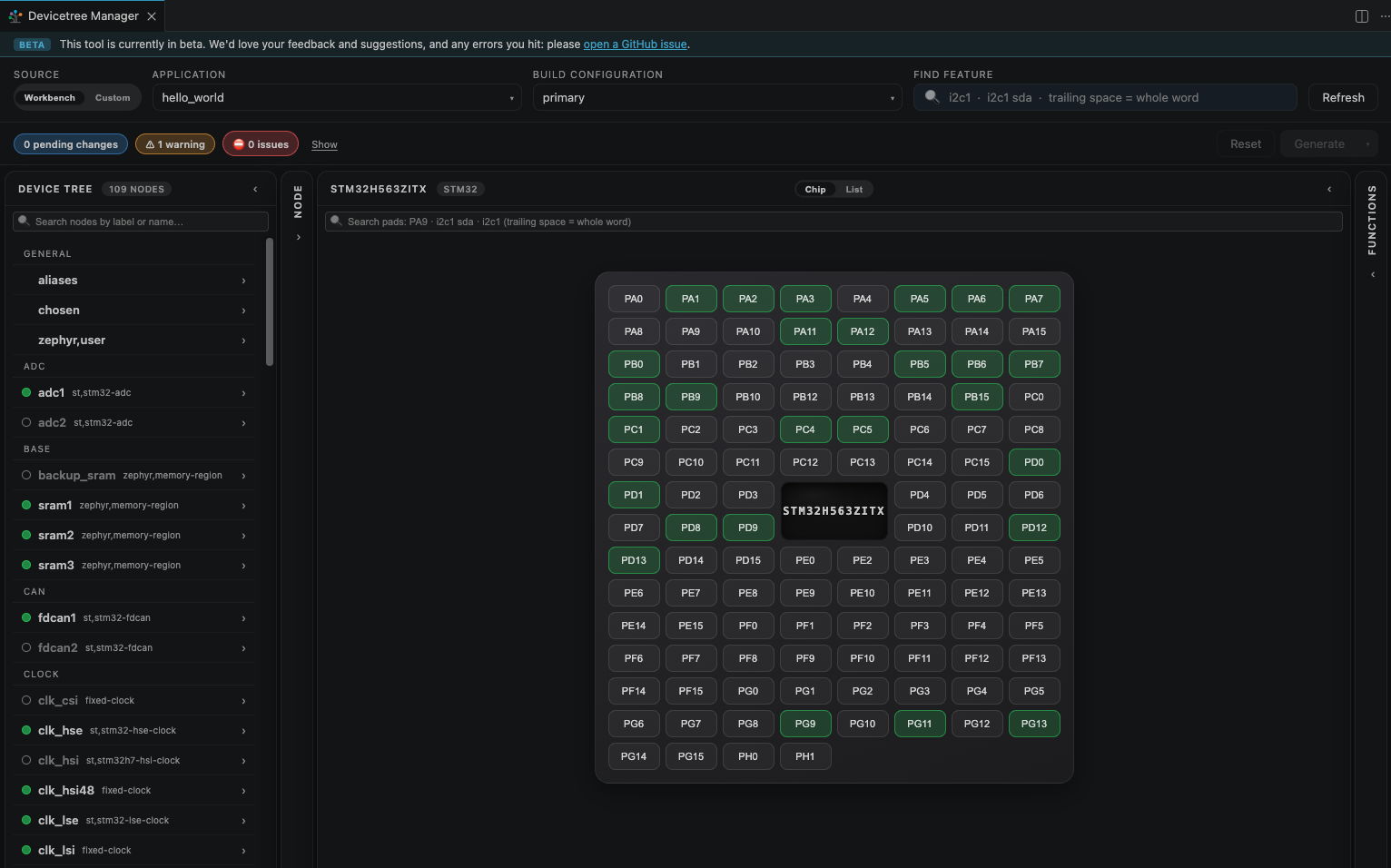
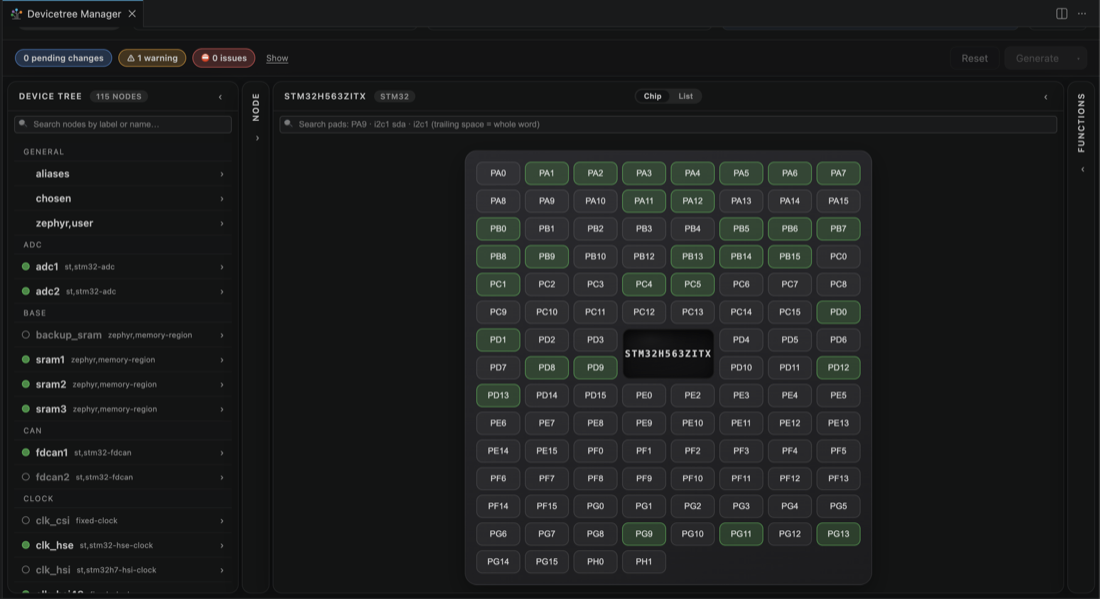
    <summary type="html"><![CDATA[<blockquote>+ <h1 class="showhide_heading d-flex justify-content-start" id="Devicetree_Manager_for_Zephyr"> Devicetree Manager for&nbsp;Zephyr<a href="#Devicetree_Manager_for_Zephyr" class="heading-link" aria-label="heading link"><span class="icon icon-link fas fa-link "   ></span></a></h1></blockquote><blockquote>+ <p></blockquote><blockquote>+ <br />The <strong>Devicetree Manager for Zephyr</strong> is a visual editor for the pin muxing and the devicetree of a Zephyr application. It is Ac6's companion to <a href="Workbench%2Bfor%2BZephyr" title="Ac6 VS Code extension for developing Zephyr RTOS applications on STM32." class="wiki wiki_page">Workbench for Zephyr</a>: you pick an application and one of its build configurations, explore the resolved devicetree, configure pins and peripherals, and generate the result as a board overlay.</blockquote><blockquote>+ </p></blockquote><blockquote>+ </blockquote><blockquote>+ <p><img src="/files/openstm32.org/zw/devicetree-manager.png"  width="820" class="regImage pluginImg img-fluid " alt="Devicetree Manager" /></blockquote><blockquote>+ </p></blockquote><blockquote>+ </blockquote><blockquote>+ <h2 class="showhide_heading d-flex justify-content-start" id="A_CubeMX_style_configurator_for_Zephyr"> A CubeMX style configurator for&nbsp;Zephyr<a href="#A_CubeMX_style_configurator_for_Zephyr" class="heading-link" aria-label="heading link"><span class="icon icon-link fas fa-link "   ></span></a></h2></blockquote><blockquote>+ <p>If you know STM32CubeMX, the idea will feel familiar: an interactive chip view where you assign signals to pads, and a properties panel for each peripheral. The difference is that it works from Zephyr's resolved devicetree, the same model for every board, so it is not tied to a single product. On STM32 the pin configurator covers all STM32 boards. It also supports NXP, ESP32 and Silicon Labs families, and more are on the way.</blockquote><blockquote>+ </p></blockquote><blockquote>+ </blockquote><blockquote>+ <p>Whatever the vendor, browsing the devicetree, editing node properties and generating the overlay always work. The interactive pinout needs a vendor backend, which is available for STM32.</blockquote><blockquote>+ </p></blockquote><blockquote>+ </blockquote><blockquote>+ <h2 class="showhide_heading d-flex justify-content-start" id="Guided_configuration"> Guided configuration<a href="#Guided_configuration" class="heading-link" aria-label="heading link"><span class="icon icon-link fas fa-link "   ></span></a></h2></blockquote><blockquote>+ <p>Enable a peripheral and the tool flags whatever is still missing until every required field and signal is set. Follow the issues in the header and they disappear one by one. When you are done it writes a <em>boards/&lt;board&gt;.overlay</em> file with a clearly delimited generated block, so your manual edits stay untouched.</blockquote><blockquote>+ </p></blockquote><blockquote>+ </blockquote><blockquote>+ <p><img src="/files/openstm32.org/dtm/i2c/01.png"  width="900" class="regImage pluginImg img-fluid " alt="The chip view of an STM32 in the Devicetree Manager" /></blockquote><blockquote>+ </p></blockquote><blockquote>+ </blockquote><blockquote>+ <h2 class="showhide_heading d-flex justify-content-start" id="Get_started"> Get started<a href="#Get_started" class="heading-link" aria-label="heading link"><span class="icon icon-link fas fa-link "   ></span></a></h2></blockquote><blockquote>+ <ul><li> Install it: <a href="Installing%2Bthe%2BDevicetree%2BManager%2Bfor%2BZephyr" title="Install the Devicetree Manager from the Marketplace or Open VSX; use it with or without Workbench for Zephyr." class="wiki wiki_page">Installing the Devicetree Manager for Zephyr</a></blockquote><blockquote>+ </li><li> Configure a peripheral: <a href="Configure%2Ban%2BI2C%2Bperipheral%2Bwith%2Bthe%2BDevicetree%2BManager" title="Step by step: enable an I2C controller and assign its pins with the Devicetree Manager." class="wiki wiki_page">Configure an I2C peripheral with the Devicetree Manager</a>, <a href="Configure%2Ba%2BUSART%2Bwith%2Bthe%2BDevicetree%2BManager" title="Step by step: enable a USART and assign TX/RX with the Devicetree Manager." class="wiki wiki_page">Configure a USART with the Devicetree Manager</a>, <a href="Configure%2Ba%2BSPI%2Bperipheral%2Bwith%2Bthe%2BDevicetree%2BManager" title="Step by step: enable a SPI controller and assign its signals with the Devicetree Manager." class="wiki wiki_page">Configure a SPI peripheral with the Devicetree Manager</a>, <a href="Configure%2Ban%2BADC%2Bchannel%2Bwith%2Bthe%2BDevicetree%2BManager" title="Step by step: add an ADC channel and assign its input pin with the Devicetree Manager." class="wiki wiki_page">Configure an ADC channel with the Devicetree Manager</a></blockquote><blockquote>+ </li><li> Reference documentation: <a class="wiki external" target="_blank" title="External link" href="https://z-workbench.com/docs/documentation/devicetree-manager" rel="external">z-workbench.com</a><span class="icon icon-link-external fas fa-external-link-alt "   ></span></blockquote><blockquote>+ <p></p></blockquote><blockquote>+ </li></ul></blockquote>]]></summary>
    <published>2026-07-12T00:15:33+00:00</published>
    <updated>2026-07-12T00:15:33+00:00</updated>
    <link rel="alternate" type="text/html" href="https://www.openstm32.org/tiki-index.php?page=Devicetree+Manager+for+Zephyr"/>
    <id>https://www.openstm32.org/tiki-index.php?page=Devicetree+Manager+for+Zephyr</id>
  </entry>
  <entry>
    <title type="html"><![CDATA[Configure an I2C peripheral with the Devicetree Manager]]></title>
    <summary type="html"><![CDATA[<blockquote>+ </p></blockquote><blockquote>+ </blockquote><blockquote>+ <h2 class="showhide_heading d-flex justify-content-start" id="Before_you_start"> Before you&nbsp;start<a href="#Before_you_start" class="heading-link" aria-label="heading link"><span class="icon icon-link fas fa-link "   ></span></a></h2></blockquote><blockquote>+ <p>Install and open the Devicetree Manager as shown in <a href="Installing%2Bthe%2BDevicetree%2BManager%2Bfor%2BZephyr" title="Install the Devicetree Manager from the Marketplace or Open VSX; use it with or without Workbench for Zephyr." class="wiki wiki_page">Installing the Devicetree Manager for Zephyr</a>. If you are new to Zephyr on STM32, start with <a href="Getting%2Bstarted%2Bwith%2BWorkbench%2Bfor%2BZephyr" title="A first Zephyr project on STM32 with Workbench for Zephyr, with a short video." class="wiki wiki_page">Getting started with Workbench for Zephyr</a>.</blockquote>]]></summary>
    <published>2026-07-12T00:15:33+00:00</published>
    <updated>2026-07-12T00:15:33+00:00</updated>
    <link rel="alternate" type="text/html" href="https://www.openstm32.org/tiki-index.php?page=Configure+an+I2C+peripheral+with+the+Devicetree+Manager"/>
    <id>https://www.openstm32.org/tiki-index.php?page=Configure+an+I2C+peripheral+with+the+Devicetree+Manager</id>
  </entry>
</feed>